In my last post I described a camera club trip to a beautiful local church. We did a lot of shooting in the sanctuary and I wandered off to other parts of the building. There was a glass fronted cabinet in another room and in it were a decanter and a sterling silver tray. They made a compelling image. Here it is after sandwiching five images taken at different exposures.
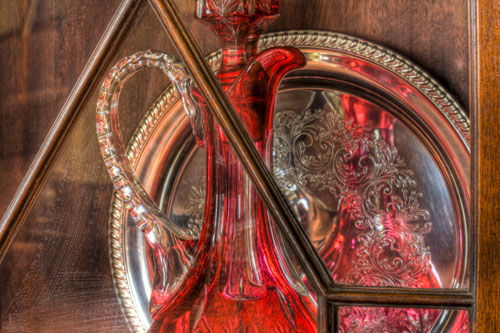
This image is small and you may not notice the smear on the glass in the lower left corner. Whoever cleaned the glass wiped over it but missed a spot. Here is a closer view:

We are definitely in the ‘whoops’ category. I tried many things in Photoshop and nothing did a credible job of cleaning it up. Sometimes the better strategy is not to try to eliminate a problem like that but to move in a different direction entirely and see if the effect is still so obvious.
Ever since I first picked up a camera, I’ve wanted to create what I’ve come to know as ‘painterly’ images, images reminiscent of paintings. There are lots of paint programs for computers and I looked into them. I found Corel Painter Essentials 4, a reduced version of Painter. Painter is the painting equivalent of Photoshop in terms of power. I downloaded the trial version and tried it. There are many effects that can be done automatically and one of them is an oil painting effect. You start with your photograph on the screen and push the button for the selected option. The screen turns white and paint daubs and strokes appear one after another, building up to a final image. If you are familiar with the Harry Potter series, it is as if someone waved a wand over the photograph and a brush went to work by magic. When it was done, this was the result.

I like this image a lot. And look at the smear in the lower left part of the image.

By no means is it gone but it is a lot less obvious. As it turns out I will be cropping out a lot of it and I will continue to work on it so if any part of it remains, it will not be obvious. The larger point I want to make, though, is that this program is now not only allowing me to mitigate errors, it is giving me a new way of looking at the world when I go out with a camera.
When I go out for a shoot, I often am splitting my looking at the world between what is there and what lens I am using. If a macro lens is on the camera , I tend to look for macro images. If a telephoto lens is on the camera, I’m looking for distant objects. That isn’t the whole story of course, if I see something interesting that requires another lens, I’ll go for it. But there is no doubt that my choice of images will now be affected not only by the lens and the intended final disposition as a photographic image, but I’ll also be looking for images that will work well as ‘paintings’. Here’s one I especially like:

Would I have gone this direction, and purchased a painting program, had someone done a thorough job of cleaning that glass cabinet? I would probably eventually have gotten there, but this speeded it up and hey, they were running a half-price offer good to the end of the month. This is getting to be more fun by the day.
 Spirit and Seeing
I love painting and reading your blog. Please check my blog article out http://segmation.wordpress.com/2011/01/22/how-to-make-your-own-oil-paints/ and thanks! segmation dot com
Painting is fun…you are putting it to excellent use.